WAV, FLAC and MP3 Bitrates Compared: A Table You Can Check With Arithmetic
CD-quality audio is 1,411 kbps; hi-res 24-bit/96 kHz is 4,608 kbps; MP3 tops out at 320 kbps. A comparison table with album sizes and how to compute your own.
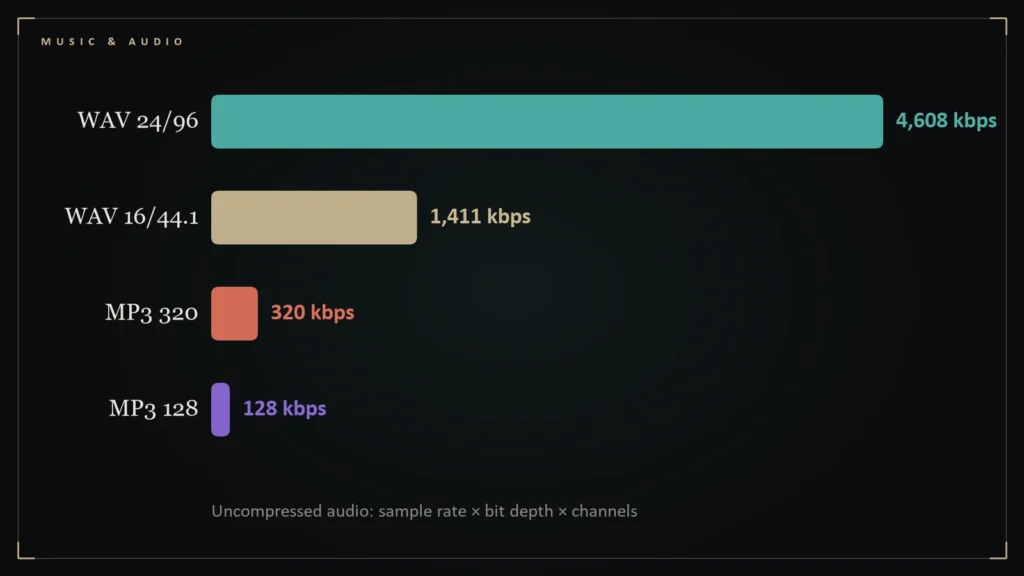
You do not need a tool to compare audio formats. You need one multiplication. Here is how the numbers work, with a table you can check yourself.
- Uncompressed CD-quality stereo (16-bit, 44.1 kHz) runs at 1,411.2 kbps, about 10.6 MB per minute.
- Uncompressed hi-res stereo at 24-bit/96 kHz runs at 4,608 kbps, about 34.6 MB per minute.
- FLAC’s output depends on the music; the FLAC project says its bitrate is roughly proportional to the information in the signal [1].
- MP3 files are fixed at bitrates such as 128 or 320 kbps, which makes their size predictable.
The formula
The data rate of uncompressed audio is sample rate times bit depth times number of channels. CD audio is 44,100 samples per second, 16 bits per sample, two channels: 44,100 × 16 × 2 = 1,411,200 bits per second, or 1,411.2 kbps. Divide by 8 for bytes, multiply by 60 for a minute: about 10.6 megabytes per minute.
The table
| Format | Bitrate | Per minute | 45-minute album |
|---|---|---|---|
| WAV, 16-bit/44.1 kHz | 1,411 kbps | 10.6 MB | about 476 MB |
| WAV, 24-bit/96 kHz | 4,608 kbps | 34.6 MB | about 1.56 GB |
| MP3, 320 kbps | 320 kbps | 2.4 MB | about 108 MB |
| MP3, 128 kbps | 128 kbps | 0.96 MB | about 43 MB |
| FLAC, any resolution | varies with the music | smaller than the WAV | smaller than the WAV |
Sizes are computed from the formula; real files add small amounts of metadata.
Why FLAC has no fixed number
FLAC is lossless compression. The FLAC project explains that the resulting bitrate is roughly proportional to the amount of information in the original signal, ranging from about the same as the input for pure noise down to almost nothing for silence [1]. A sparse acoustic recording therefore compresses far more than a dense, loud mix, and the only reliable way to know a FLAC file’s size is to look at it.
What bitrates tell you and what they do not
- For lossless formats, bitrate describes size and resolution, not quality: the sound is the same as the source.
- For MP3, bitrate is a rough proxy for quality, because a lossy encoder discards more at lower rates.
- A high bitrate in a lossy file does not make it lossless: a 320 kbps MP3 is still lossy.
Do it yourself
To size any download, multiply minutes by the per-minute figure above. To check what you actually have, open the file’s properties: a FLAC or WAV at 16-bit/44.1 kHz is CD quality, while 24-bit at 96 or 192 kHz is hi-res. For the bigger picture of what these formats mean, see our guide to what lossless audio is and our WAV vs FLAC comparison.
Questions readers ask
How do I calculate an audio file's size?
Multiply sample rate, bit depth and channels to get bits per second, then convert to megabytes per minute: CD-quality stereo is about 10.6 MB per minute uncompressed.
Why does FLAC not have a fixed bitrate?
Because its bitrate tracks the amount of information in the signal, from near the input rate for noise to almost zero for silence [1].
References
- FLAC FAQ — Xiph.Org Foundation — https://xiph.org/flac/faq.html